



Sitagri for Excel
Agricultural markets in Excel.
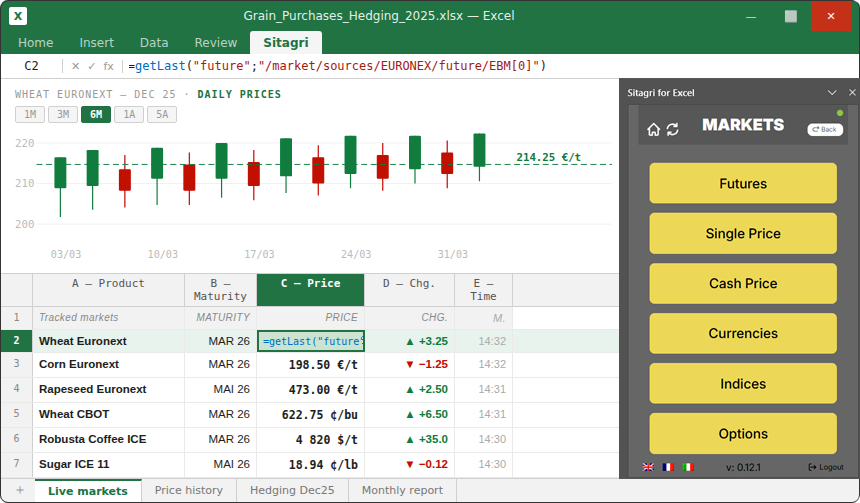
Import real-time Euronext, CBOT, and ICE prices along with cash prices directly into your spreadsheets. Make better decisions without leaving Excel.
50
COMMODITIES COVERED
20
YEARS OF FUTURES PRICE HISTORY
1 000+
CASH PRICE BENCHMARKS
15+
INTEGRATED SOURCES (EURONEXT, CBOT, ICE…)
Your models. Your data. Your Excel.
ZERO DATA GAPS
No more copying and pasting prices from Sitagri Desktop to your file. Data flows directly into your cells the moment you need it.
DECISIONS BASED ON REAL DATA
Real-time futures prices, 20-year price history, local cash benchmarks—all the raw material you need to build your analyses and hedges.
YOUR MODELS REMAIN YOUR OWN
Sitagri for Excel enhances your existing files. No migration, no heavy training—you continue working in the tool you already master.
What you get
in your Excel.
REAL-TIME PRICES
PRICE HISTORY - 20 YEARS
Access over twenty years of futures price history for all covered markets. Build your seasonalities, backtest your hedging strategies, and feed your forecasting models directly from your Excel cells.
CASH PRICES & LOCAL BENCHMARKS
Over 1,000 physical cash price benchmarks, covering major production and collection areas. Directly integrate local basis and trading prices into your margin tracking tables.
NATIVE MICROSOFT 365 INTEGRATION
Available directly on Microsoft Marketplace, Sitagri For Excel installs in seconds from the Excel interface. Automatic updates, Windows and Mac compatibility, and centralized deployment possible via your IT department.
Made for professionals in the agri-food sector.
TRADERS & BROKERS
ANIMAL FEED MANUFACTURERS
AGRICULTURAL COOPERATIVES
INDUSTRIAL PLAYERS & BUYERS
Mills, malt houses, processors, retail buyers—you need to track agricultural raw material trends to manage your purchases and protect your margins.
Available on Microsoft Marketplace.
INSTALLED IN 3 CLICKS.
Updated
automatically.
The new version of Sitagri For Excel is now available directly on Microsoft Marketplace. The add-in installs without IT intervention, works on Windows and Mac, and receives updates automatically—you always have access to the latest data and features without any action on your part.
01
Open Excel → Add-ins → Microsoft Marketplace
02
Search for “Sitagri” and click Add
03
Log in with your Sitagri account and start importing data
READY TO WORK WITH
REAL DATA?
Install Sitagri For Excel from Microsoft Marketplace and connect your files to global agricultural markets.
Follow us

© FinanceAgri 2026 | Legal notice | Index methodology | Contact